How to Build a Production-Ready RAG AI Agent in Python
Most retrieval-augmented generation (RAG) tutorials stop the moment the demo works. You upload a PDF, ask a question, get an answer, and the video ends. What they rarely show you is what happens next: the app crashes under real traffic, a single failed API call brings the whole pipeline down, and you have no idea why, because there are no logs, no retries and no visibility into what your AI agent actually did.
This guide walks through building a PDF-based RAG application in Python that is genuinely ready for production, not just a weekend demo. You will use a vector database to store and search document embeddings, FastAPI to serve the application, and Inngest as an orchestration layer that adds the observability, retries, throttling and rate limiting that separate a prototype from a product.
What makes a RAG application "production-ready"?
A working RAG pipeline and a production RAG pipeline are not the same thing. The core logic, embed the documents, search for relevant chunks, pass them to a large language model, can be written in an afternoon. What takes longer, and what actually matters once real users are involved, is everything around that logic:
Observability
When a query fails at 2am, you need to see exactly which step broke, what data it received, and why it errored, without digging through print statements scattered across your codebase.
Automatic retries
Calls to embedding models and language models fail for all sorts of transient reasons: rate limits, timeouts, momentary provider outages. A production system retries intelligently instead of simply crashing.
Throttling and rate limiting
Without limits, a single misbehaving client (or an eager user re-uploading the same file) can burn through your API budget or trigger provider-side rate limits that take down the whole app for everyone else.
Chunking strategy
How you split documents before embedding them has a direct effect on answer quality. Chunks that are too large dilute relevance; chunks that are too small lose context.
Once these pieces are in place, you have something you could realistically hand to a client or ship to users, not just something that works when you are the only one testing it.
The tech stack for a production RAG pipeline
The stack used in this build is deliberately lightweight and largely free to run locally:
Python, managed with uv for fast dependency management
FastAPI and Uvicorn to serve the API
Qdrant, run locally in Docker, as the vector database
LlamaIndex to load and chunk PDF documents
OpenAI for embeddings (
text-embedding-3-large) and generation (gpt-4o-mini)Inngest for orchestration, step-based retries, and observability
Streamlit for a simple front end
None of these choices are set in stone. You could swap OpenAI for an open-weight model, or Qdrant for another vector store, and the orchestration pattern would still hold. If cost or data privacy is a concern, it is worth reading up on how LoRA fine-tuning lets you adapt a smaller open model to your own documents instead of leaning entirely on a general-purpose API, which can shrink both your inference bill and your dependency on a single provider.
Step 1: Set up the project and dependencies
Start by initialising a new Python project and installing the core dependencies:
uv init .
uv add fastapi inngest llama-index-core llama-index-readers-file python-dotenv qdrant-client uvicorn streamlit openai
Create a .env file to store your OpenAI API key. Keep this file out of version control; it is the one thing in the whole stack you genuinely cannot afford to leak.
Step 2: Run Qdrant locally with Docker
Qdrant is a high-performance vector database that stores documents as numerical vectors and lets you search for similarity extremely quickly. Running it locally via Docker means you can develop and test without paying for a hosted instance:
docker run -d --name qdrant -p 6333:6333 -v ${PWD}/qdrant_storage:/qdrant/storage qdrant/qdrantFrom there, a simple Python wrapper class handles connecting to the database, creating a collection with the correct vector dimensions (3072, to match OpenAI's text-embedding-3-large model), and exposing upsert() and search() methods.
Step 3: Load, chunk and embed your documents
PDFs cannot be embedded whole; a thousand-page document has to be broken into smaller pieces first. Using LlamaIndex's SentenceSplitter, documents are split into chunks of around 1,000 characters, with a 200-character overlap so that context is not lost at the boundary between chunks.
Each chunk is then sent to OpenAI's embeddings endpoint, converting text into a 3,072-dimension vector that can be compared for similarity against every other vector in the database using cosine distance.
Step 4: Orchestrate everything with Inngest
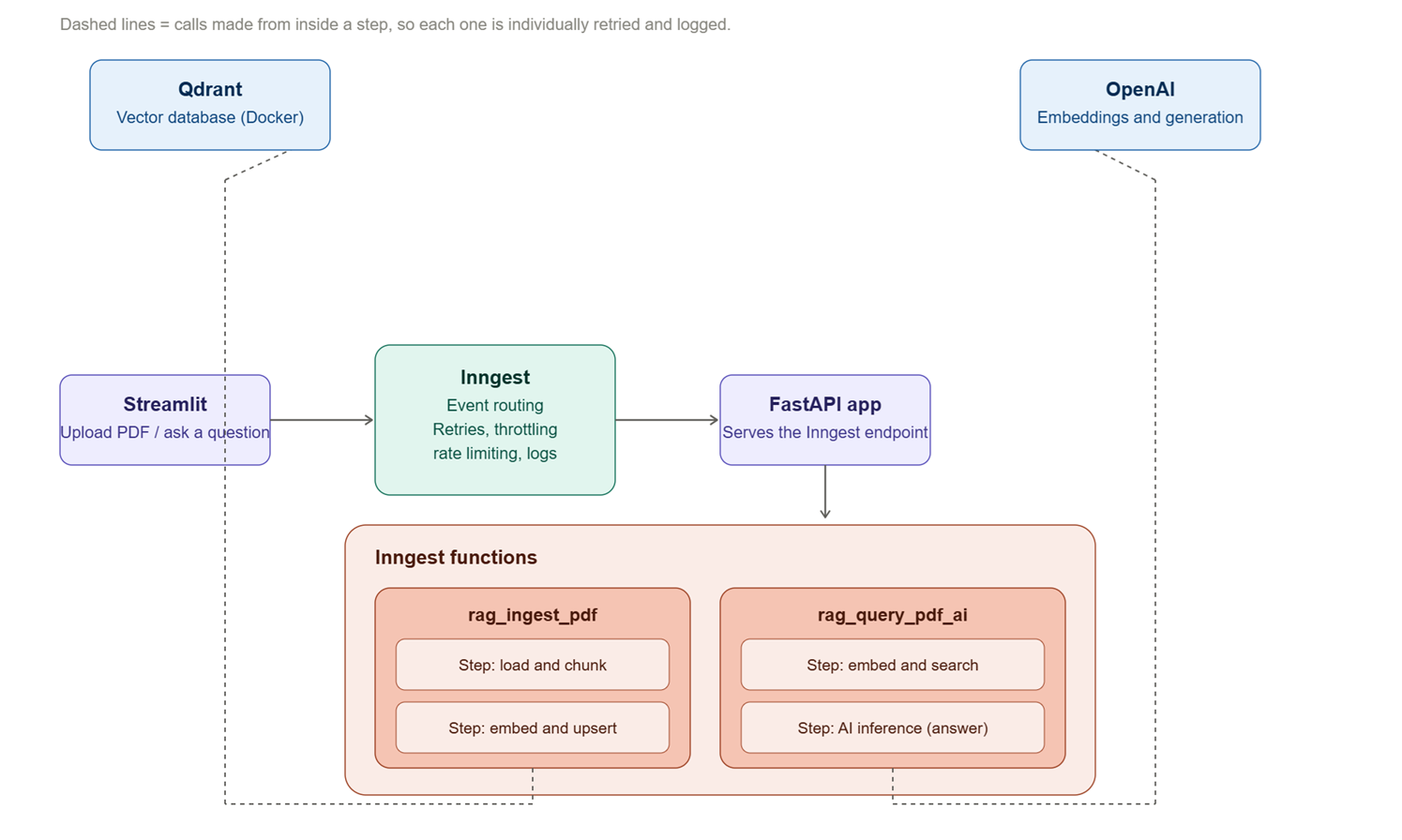
This is where the application stops being a script and starts being a system. Rather than calling functions directly, each meaningful operation, loading a PDF, embedding it, searching the vector database, generating an answer, is wrapped in an Inngest step. This gives every operation:
Automatic retry logic if it fails
A full, inspectable log of inputs, outputs and timing
The ability to run steps sequentially or in parallel
Built-in throttling and rate limiting, configurable per function or even per document
Two Inngest functions handle the core workflow:
Ingesting a PDF
Triggered by a rag/ingest_pdf event, this function runs two steps: load and chunk the document, then embed and upsert it into Qdrant.
Querying a PDF
Triggered by a rag/query_pdf_ai event, this function embeds the user's question, searches the vector database for relevant chunks, builds a prompt from that context, and calls the language model through Inngest's AI inference step, which inherits the same retry and observability benefits as everything else.
Running the free local Inngest dev server gives you a dashboard where every run, successful or failed, can be inspected step by step. It is, frankly, the single most useful addition in this entire build for anyone who has ever tried to debug a silent AI pipeline failure at speed.
Step 5: Add a front end with Streamlit
A minimal Streamlit interface lets users upload a PDF and ask questions about it. Under the hood, the front end does not call your business logic directly; it sends events to Inngest, which then triggers the appropriate function and, because the process is asynchronous, polls for the result once it completes.
Why this pattern matters beyond a single project
The pattern here, wrap AI operations in observable, retryable steps rather than bare function calls, applies well beyond PDF chat apps. It is the same discipline that separates a proof-of-concept computer vision script from a system you would trust to run unattended. If you are exploring where AI workloads run rather than just how they are orchestrated, it is worth looking at how running inference on the edge changes the reliability and latency trade-offs covered in a separate breakdown of edge AI deployment on constrained hardware.
Taking it to production
Getting this running locally is most of the battle, but a genuine production deployment adds a few more considerations:
Deploying the Inngest server (or using their managed offering) rather than the local dev server
Generating and securing an event key so functions cannot be triggered by anyone who finds your endpoint
Moving Qdrant to a managed or self-hosted production instance rather than a local Docker volume
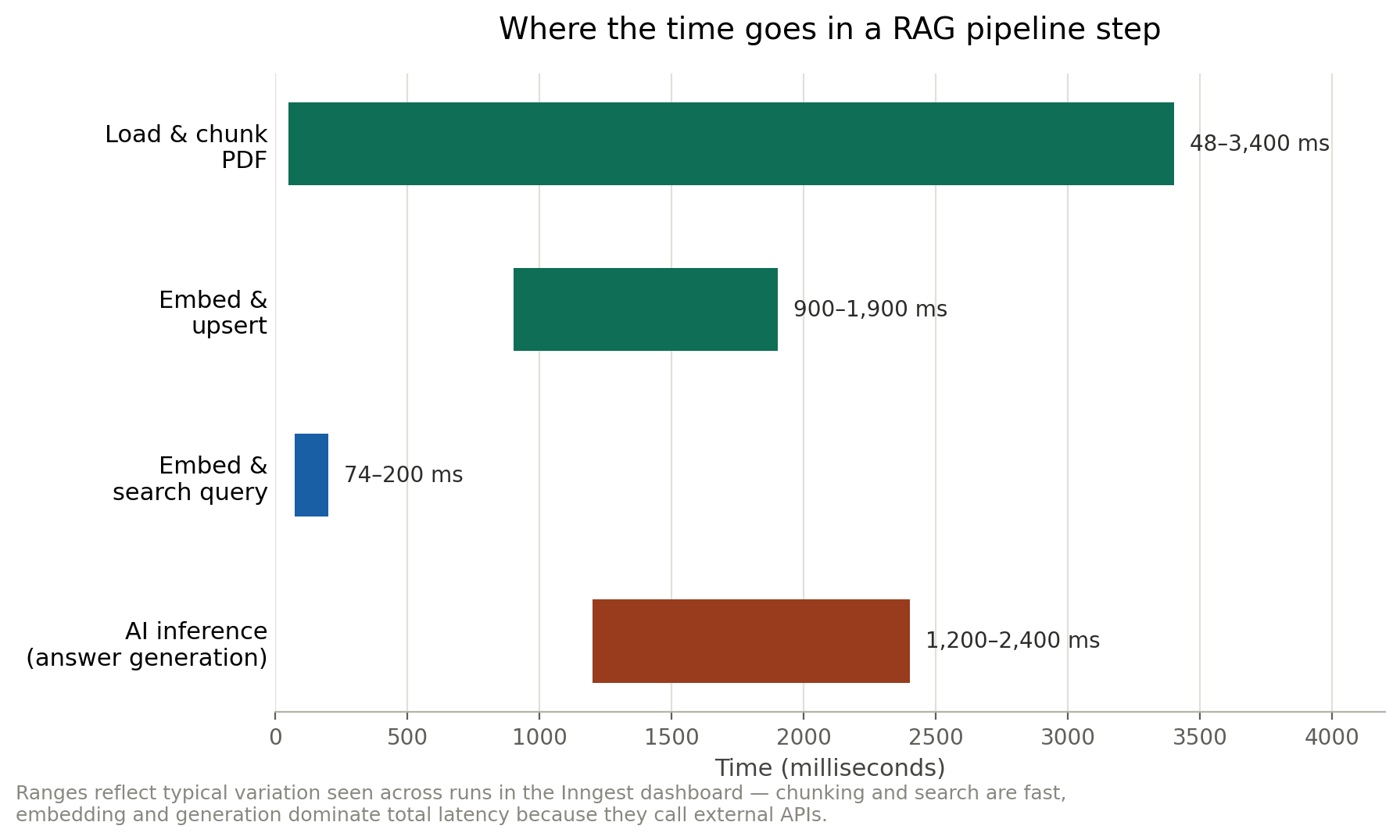
Monitoring cost, particularly embedding and inference spend, as usage scales
None of these are difficult on their own, but they are exactly the kind of details that get skipped in tutorials and discovered the hard way in production.
Frequently asked questions
What is RAG in simple terms?
Retrieval-augmented generation (RAG) is a technique where a language model's response is grounded in specific data retrieved from a knowledge base, such as a set of PDFs, rather than relying purely on what the model learned during training. The relevant information is retrieved first, then passed into the prompt alongside the user's question.
Why use Inngest instead of just calling functions directly?
Calling functions directly works fine for a demo, but offers no visibility, retry logic or rate limiting when something fails. Inngest wraps each operation in a "step" that is automatically logged, retried on failure, and observable through a dashboard, which is the difference between debugging blind and debugging with a full trace of exactly what happened.
Do I need a paid vector database to build a production RAG app?
No. Qdrant can be run locally for free via Docker during development, and self-hosted in production if you prefer not to pay for a managed service. It only becomes a cost consideration once you are storing and searching large volumes of data at scale.
What chunk size should I use when splitting documents?
There is no universal answer, but a chunk size of around 1,000 characters with roughly 200 characters of overlap is a reasonable starting point. Smaller chunks improve precision but can lose surrounding context; larger chunks preserve context but dilute relevance. It is worth testing a few configurations against your own documents.
Is this approach only useful for PDFs?
Not at all. The same architecture, chunk and embed your data, store it in a vector database, retrieve relevant context, generate a grounded answer, applies to any text-based knowledge source: support tickets, internal wikis, transcripts, contracts, or product documentation.